Azure Bicep gotchas from real deployments

Azure Bicep gotchas from real deployments
The pipeline was green. Azure Portal said Succeeded. The resource group looked tidy. Ten minutes later a support chat started with “why can anyone on the internet hit our storage account?”
That is the Bicep gotcha I care about. Not a compile error. Not a missing subscription. A deployment that worked, while production behaviour quietly disagreed with what we thought we had declared.
I write this as someone who ships Azure with Bicep for real teams in the UK, not as a documentation mirror. Bicep is excellent. The pain lives in defaults, existing resources, and the gap between what-if and apply.
The thesis in one breath
Bicep looks declarative. ARM is still opportunistic about defaults, scopes, and evaluation order.
If you skip an optional parameter, Azure often fills in something permissive or local-redundant. If you reference an existing resource without the right scope, you get NotFound at the worst moment. If you trust the portal card more than the parameter file, you will debug the wrong layer.
Smaller diffs. What-if before apply. Own the green bar.
When “Succeeded” lies about behaviour
Verdict: a green deployment proves ARM accepted your template. It does not prove your security, SKU, or redundancy intent landed.
I have seen this pattern more than once. Storage goes up. App Service plan goes up. Key Vault goes up. CI posts a cheerful emoji. Then someone notices publicNetworkAccess is Enabled, the SKU is Standard_LRS when the design said geo-redundant, or zone redundancy never engaged because capacity was left at the default of one.
None of those failures need a red pipeline. They need a human who reads parameters the way they read a change request.
Microsoft’s own storage account template examples show optional networking knobs such as publicNetworkAccess and networkAcls.defaultAction. If you omit them, you inherit whatever the resource provider treats as the baseline for that API version — and for storage that baseline is often more open than a production checklist wants. See the storageAccounts resource reference.
Same story for App Service zone redundancy: Microsoft documents that zoneRedundant: true needs sku.capacity of at least 2, and that capacity defaults to 1 if you leave it out. That is not a Bicep bug. That is a silent miss waiting to become an incident. Details: Configure App Service plans for zone redundancy.
Param and default traps
Verdict: optional parameters are the fastest way to deploy the wrong thing while feeling tidy.
I used to treat optional params as kindness for callers. Now I treat them as loaded guns. If a value gates geo-redundancy, SKU, zones, or public network access, I want it required — or I want a default that is deliberately safe, not conveniently permissive.
Here is the shape of trap I still catch in reviews:
@description('Storage SKU. Prefer Standard_GZRS for prod.')
param storageSkuName string = 'Standard_LRS'

@description('Allow public network access to the storage account.')
param publicNetworkAccess string = 'Enabled'

resource stg 'Microsoft.Storage/storageAccounts@2025-06-01' = {
  name: storageName
  location: location
  sku: {
    name: storageSkuName
  }
  kind: 'StorageV2'
  properties: {
    minimumTlsVersion: 'TLS1_2'
    supportsHttpsTrafficOnly: true
    allowBlobPublicAccess: false
    publicNetworkAccess: publicNetworkAccess
    networkAcls: {
      defaultAction: 'Allow'
      bypass: 'AzureServices'
    }
  }
}
Read that again slowly. The Bicep is valid. The defaults are the problem. A module author who wanted “easy first deploy” just made LRS and public access the path of least resistance for every environment that forgets to override.
What I do instead:
- Make prod-sensitive params required in the module that actually creates the resource.
- Put environment values in
.bicepparamfiles, not in tribal memory. - Prefer a deny-by-default network stance when the module is meant for anything beyond a sandbox.
- Say the unsafe default out loud in the PR description if I must keep it for local demos.
Key Vault has its own flavour of default surprise. Soft delete is on by default for new vaults and cannot be turned off afterwards; purge protection is separate and off unless you enable it. Names stay reserved during retention. That pair of facts has burned more than one “delete and recreate with the same name” recovery. Microsoft documents the behaviour in Key Vault soft-delete overview.
existing, scope, and resourceId mistakes
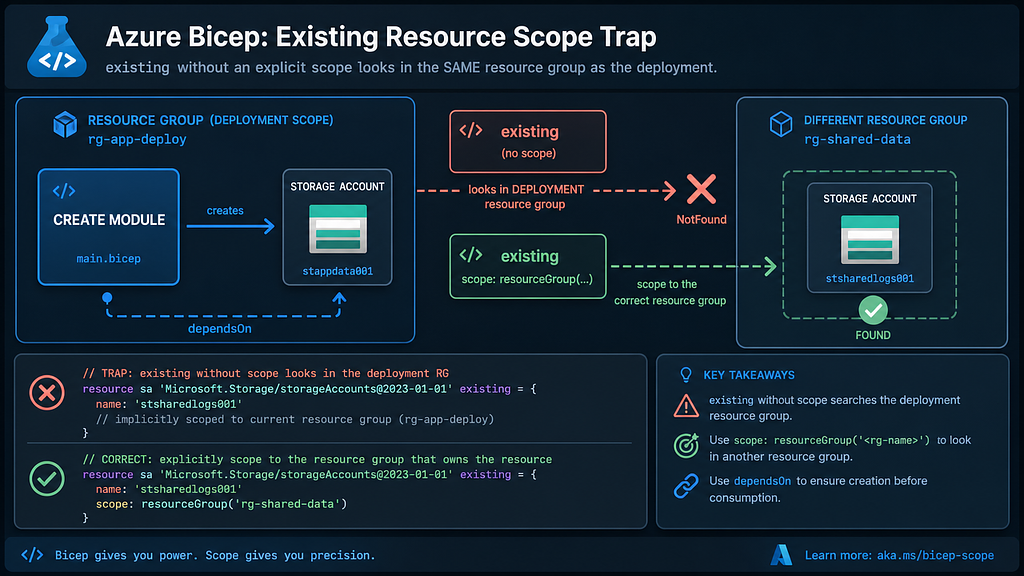
Verdict: existing does not create anything. Wrong scope looks like a missing resource, not a wrong line of Bicep.
This is the classic afternoon sinkhole. Someone creates a storage account in a module aimed at rg-data. Later, a parent template wants the blob endpoint and declares:
resource stg 'Microsoft.Storage/storageAccounts@2025-06-01' existing = {
  name: storageName
}

output blobEndpoint string = stg.properties.primaryEndpoints.blob
That compiles. It also looks for storageName in the deployment resource group. If the account lives elsewhere, ARM answers with NotFound. Microsoft’s guidance is explicit: set scope when the resource is in a different resource group, for example scope: resourceGroup(exampleRG). See Reference existing resources in Bicep.
The safer pattern for cross-RG reads:
param dataRgName string
param storageName string

resource stg 'Microsoft.Storage/storageAccounts@2025-06-01' existing = {
  name: storageName
  scope: resourceGroup(dataRgName)
}

output blobEndpoint string = stg.properties.primaryEndpoints.blob
I also try not to hand-roll resourceId(...) strings when a symbolic name will do. Symbolic references give you implicit dependencies and fewer typos. Stringly-typed IDs are fine for tooling glue; they are a bad default for day-to-day Bicep.
One more subtlety: an existing resource is a read, not a deploy step. If another module is still creating that resource in the same parent deployment, you can race yourself. Depending on language version and symbolic name code generation, an explicit dependsOn on existing may or may not delay the read the way you hope. Prefer depending the consumer on the creator module, or pass the needed values out as module outputs. Microsoft’s troubleshooting notes cover the NotFound case and implicit dependencies in Resource not found errors.
DependsOn, implicit deps, and module output loops
Verdict: most of the time you do not need dependsOn. When you do, put it on the thing that waits, not on the thing that already exists.
Bicep builds implicit dependencies when you reference another resource’s symbolic name or property. That is the happy path. Explicit dependsOn is for the awkward cases: side effects you cannot express as a property reference, or a module that must finish before you target its resource group.
The failure mode I see in reviews is the dependency loop dressed as cleanliness. Module A outputs a value that Module B needs. Module B outputs something Module A somehow also needs. Suddenly you are inventing temporary resources or splitting files at 5pm because the graph will not settle.
Rules of thumb I actually use:
- Prefer property references over
dependsOn. - Prefer module outputs over re-reading with
existingin the parent when you just created the resource in a child module. - If a child deploys into a resource group the parent just created, depend the child module on the create-RG module (or pass the RG name through an output used in
resourceGroup(...)). - Do not sprinkle
dependsOn“just in case.” It hides real design problems and makes templates harder to reason about.
When Microsoft says for most deployments you do not need explicit dependsOn, they mean it. Use it like salt, not like sauce. See the same Resource not found guidance for the implicit-versus-explicit distinction.
Portal vs Bicep drift
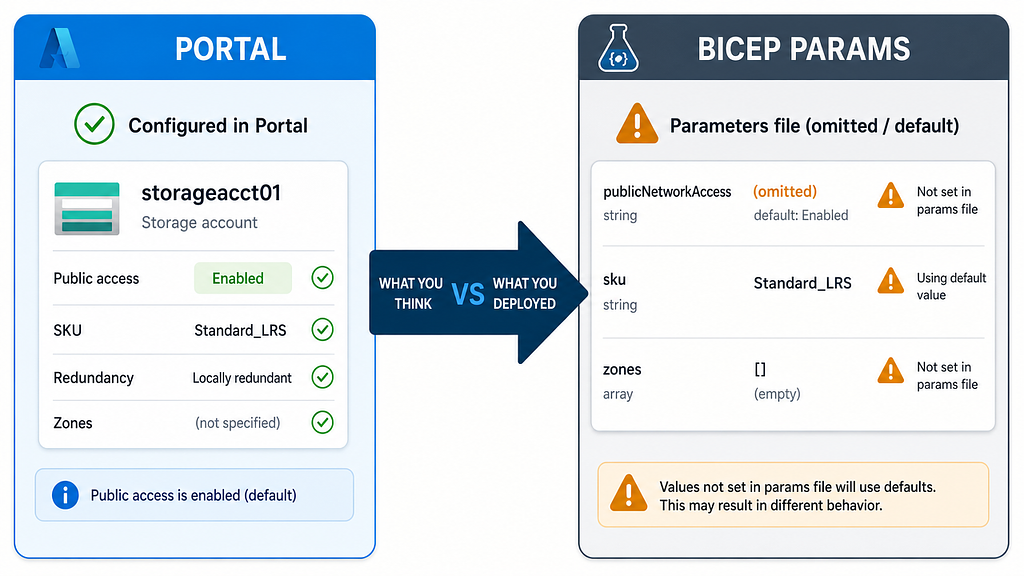
Verdict: the portal shows the live resource. Your Bicep shows intent. Drift lives in the gap, and optional params make the gap wider.
Someone clicks through Networking in the portal and tightens public access. The next pipeline run redeploys the module with the old permissive default. Suddenly the portal change is gone, and the ticket history says “infrastructure as code won.” Technically true. Operationally rude.
The opposite happens too. A well-meaning engineer “just fixes it in the portal” during an incident. Bicep still describes the broken state. The next apply looks like a no-op or a surprise overwrite depending on which properties were in the template.
My working rule:
- Production settings that matter belong in source control.
- Portal is for investigation and emergency breaks-glass, then a follow-up PR.
- If what-if shows a noisy Modify on a property you never meant to manage, decide: take ownership in Bicep, or stop deploying that property.
Exporting a resource from the portal into Bicep is a useful bootstrap. It is not a finished module. Portal exports love optional properties, generated names, and API versions that may not match the rest of your repo. Treat the export as clay, not gospel.
What-if before az deployment group create
Verdict: run what-if. Read it. Then apply. Skip that and you are volunteering for archaeology.
Microsoft documents the what-if operation for Bicep at Preview Bicep deployment changes with what-if. The CLI form I use constantly:
az deployment group what-if \
  --resource-group rg-app-prod \
  --template-file main.bicep \
  --parameters main.prod.bicepparam
And when I am deploying interactively:
az deployment group create \
  --resource-group rg-app-prod \
  --template-file main.bicep \
  --parameters main.prod.bicepparam \
  --confirm-with-what-if
--confirm-with-what-if (or -c) shows the predicted changes and asks before continuing. That prompt has saved me from deleting a subnet I thought I was only tagging.
What-if is not omniscient. Microsoft lists real limits: nested expansion caps, short-circuiting when a resource ID cannot be calculated yet, and expressions that stay unevaluated (utcNow(), newGuid(), secure params, list* functions, references to resources outside the template). Noise exists — properties reported as deleted because the template omitted a default the platform will put back. Use a recent Azure CLI so diagnostics about incomplete analysis actually show up.
In pipelines I treat what-if as a gate artefact, not a decoration. Capture the text. Fail the job on unexpected Deletes or unexpected public network flips. Humans still review the scary ones. Automation catches the boring repeats.
Failure modes and how I recover
Verdict: most Bicep failures are either NotFound, validation, or “it deployed the wrong thing.” Each needs a different recovery.
NotFound during deploy. Check name, resource group, subscription, and whether the resource is still being created by a sibling module. Fix scope on existing, or depend on the creator module and pass outputs. Do not keep redeploying hoping ARM will invent the resource.
Validation / BadRequest. Read the target property. SKU and zone combinations are frequent offenders. Zone-redundant App Service with capacity 1 is a classic. Wrong location for a SKU is another. Fix the params; do not widen quotas until the config is sane.
Green deploy, wrong behaviour. Diff the parameter file against the design. Check portal Networking, SKU, redundancy, and identity. Put the missing properties into Bicep and redeploy deliberately. Write a short post-incident note so the next person does not re-learn it from production.
Name still reserved after delete. Soft-deleted Key Vaults (and some other names) sit in retention. Recover, purge if policy allows, or pick a new name. Fighting the reservation clock is rarely worth it.
What-if said Ignore / incomplete. Nested modules may have short-circuited. Simplify the preview target, upgrade CLI, or what-if the child module directly until you trust the parent again.
Recovery is boring on purpose. Revert the bad parameter change. Redeploy incremental. Verify with a checklist, not vibes. If you need complete mode, you need a change window and a what-if that you actually read.
Closing: smaller diffs, what-if, own the green bar
I do not want Bicep templates that impress at a meetup. I want ones a tired engineer can review on a Thursday afternoon without missing a public endpoint.
That means required params for the sharp edges. Explicit scope on existing. Outputs instead of hopeful re-reads. Portal changes followed by a PR. What-if before apply. A green pipeline that someone still owns.
Bicep will keep getting better. Defaults will keep being tempting. The teams that stay out of trouble are the ones who treat “Succeeded” as the start of verification, not the end of thinking.
If this saved you one Saturday restore, good. Ship the smaller diff. Run what-if. Own the green bar.